AppSwitcher: a thank-you to Apptivate
For years I have relied on Apptivate by Cocoabeans Software. It is one of those tiny Mac utilities that disappears into muscle memory: hit Control+1 and land in the app you want. If it is already open, it comes forward. If it is not, it launches. That is basically it. Tiny, focused, delightful.
I cannot overstate how much Apptivate has improved my day-to-day on a Mac, it’s like all the benefits of a tiling window manager without the hassle of setting one up. Huge gratitude to it. Tools like this are easy to take for granted until you try living without them.
Apptivate still works for a lot of people, but it looks effectively abandoned for the modern Mac. Last meaningful updates are old, it is Intel/Rosetta-era software, and there is a chance it simply will not run on some future macOS. macOS started screaming some warnings at me about it recently…
So I wrote AppSwitcher: a from-scratch native rewrite of the part I could not live without. Global hotkeys that activate an app if it is open and launch it if it is not, plus a menu bar to manage them. Built for Apple Silicon and current macOS.
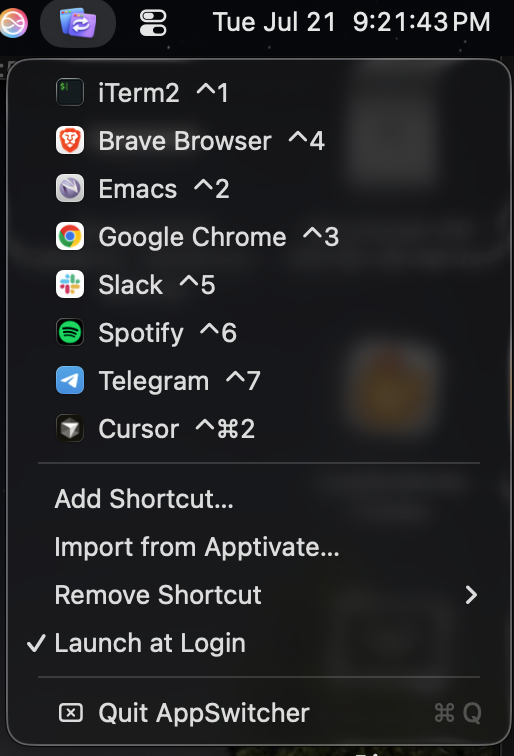
This is not a takeover. It is a thank-you and a lifeboat. If you still have an Apptivate config, AppSwitcher can import it.
Get it
Download the latest build from the GitHub releases, drop it in Applications, and clear quarantine if macOS complains:
xattr -cr /Applications/AppSwitcher.app
open /Applications/AppSwitcher.app
Look for the icon in the menu bar (no Dock icon). Click it to add shortcuts. If a hotkey never fires, allow AppSwitcher under Privacy & Security → Input Monitoring.
https://github.com/sponrad/appswitcher
Again: thank you, Apptivate. AppSwitcher exists because yours was so good that losing it was not an option.